Research and policy comparison
Compare editions, positions, regulations, or reports and keep a reviewable trail.
 YourpersonalHI
Bring documents, web pages and Obsidian notesinto one searchable knowledge base.Ask, compare and connect ideas.You decide with HI's helpwhat becomes Working Knowledge.

The problem worth solving
Important work needs visible sources, a clear boundary between evidence and interpretation, and a person who decides what is kept or acted on.
The loop
WATCH IT WORK
Ask a question of your own documents, open the cited passage, then use Sources only for a question the library does not support and watch GI JI stop without writing an answer.
Human authority
GI JI can search, cite, explain and suggest; you decide which sources matter, which interpretations remain and which proposed actions proceed.

Reusable intelligence
Working Knowledge gives approved findings a durable place beside their sources, so useful understanding can support later work instead of ending with one answer.

Human intelligence, directing the software
HI is the assistance layer across GI JI: it explains, interprets, suggests a next step and waits for your confirmation before carrying out an instructed task.

Real use cases
Compare editions, positions, regulations, or reports and keep a reviewable trail.
Build a course or topic library, ask source-linked questions, and approve reusable explanations.
Keep project sources grouped, expose changes, and separate original evidence from interpretation.
Organize books and references without blending source text with your own derived notes.
GI JI is not legal, medical, financial, or compliance advice. Verify anything you rely on.
FOUNDATION STAGE
GIJI Intelligence is GI JI Agency’s foundation-stage research direction: improving how knowledge is formed, connected and reused to build more capable intelligence. It is separate from the capabilities shipped in GI JI 0.13.
DIRECTION
This direction explores how better knowledge structures, human judgment and more deliberate use of computation could improve intelligence without treating scale as the only path. It is a direction, not a measured environmental claim.
The appearance
Sage Mist brings quiet green surfaces, clear contrast and the Inter typeface into the workspace. Sage Mist · Night provides the dark appearance, while the Main-colour picker lets you choose the interface accent.


What you are buying
Begin with the Free edition and choose Personal when GI JI earns a place in your work.

GI JI — PRIVATE KNOWLEDGE WORKSPACE
HI means human intelligence. Your sources stay distinct from reviewed knowledge.AI prepares drafts; you inspect the supporting material and decide what GI JI may reuse.
Import text-based PDFs, DOCX files, notes, HTML, or permitted websites. PDF import requires Poppler's pdftotext. When an answer uses your sources, each citation opens its supporting passage. Sources only stops when it cannot attach enough usable source evidence.
Review Terms and Refunds$79 USD introductory price. The planned regular price is $99 USD; no change date is scheduled. Applicable tax is added at checkout. One payment. Every update to GI JI is included.
Private on this computer is the default · Connected AI writing stops for review and approval · 14-day money-back guarantee GI JI 0.13.0 is a production release for macOS, Windows and Linux. Windows is available from the Microsoft Store or as a direct download.
WATCH IT WORK
Ask a question of your own documents, open the cited passage, then use Sources only for a question the library does not support and watch GI JI stop without writing an answer.
FROM ANSWER TO ASSET
Ordinary AI conversations are good at producing a momentary answer. They are less good at preserving the source, the human decision, and the knowledge worth reusing later. GI JI is designed around a different outcome: a library you own, evidence you can inspect, and reviewed knowledge that can grow without becoming confused with the original material.
A momentary chat
The answer moves up the thread.
A governed knowledge workflow
THE CENTRAL BOUNDARY
Your sources
Working Knowledge
AI may draft. GI JI shows the evidence. You edit and decide. Changed evidence pauses the note.
THE GOVERNED KNOWLEDGE LOOP
Import permitted files, folders, or supported websites. Organize them by Collection, Perspective, and preparation depth.
Choose Sources only, Guided, or Open and ask a real question.
Open the exact cited passage and see what was retrieved.
Review a candidate knowledge card, edit it, and set your checking state.
Approved knowledge may help future Guided or Open answers. Sources only still ignores it.


Source suitability
GI JI does not perform OCR. This boundary is checked before a buyer spends hours importing the wrong material.
ANSWER BOUNDARIES
Original material only. Stop instead of guessing. Ignore all Working Knowledge.
Sources plus approved, active, non-stale Working Knowledge. If those do not support an answer, GI JI asks before using clearly marked general knowledge.
Searches your sources first, then may add clearly marked general context when useful. General context is never cited to your documents.


HUMAN-APPROVED KNOWLEDGE
GI JI can prepare candidate notes from evidence. Nothing becomes reusable silently. Inspect the support, edit the wording and scope, add categories or tags, record your checking state, then approve, pause, reject, or remove it.
Validation bands record how far you have reviewed a note. They are not AI confidence, truth probability, or answer accuracy.

PRIVATE-FIRST BY DESIGN
GI JI searches the local library first. Optional Connected AI uses your own OpenAI API account. Setting up a key contacts OpenAI to list the models available to that account. Connected AI is off until you switch it on. Before it writes anything for you, GI JI stops, shows you what it wants to send, and waits for you to approve that one request. You can keep the API key for the current session or choose to remember it on this computer. A remembered key is stored in data/connected.json inside the GI JI folder, excluded from GI JI backups, and removed when you choose Forget this key.
Default
Local library search and local writing with installed models.
Optional
One bounded, previewed request using your own OpenAI API account.
Local by default. Connected only by explicit, request-specific approval.
Setting up a key contacts OpenAI to list the models available to that account. Connected AI is off until you switch it on. Before it writes anything for you, GI JI stops, shows you what it wants to send, and waits for you to approve that one request.
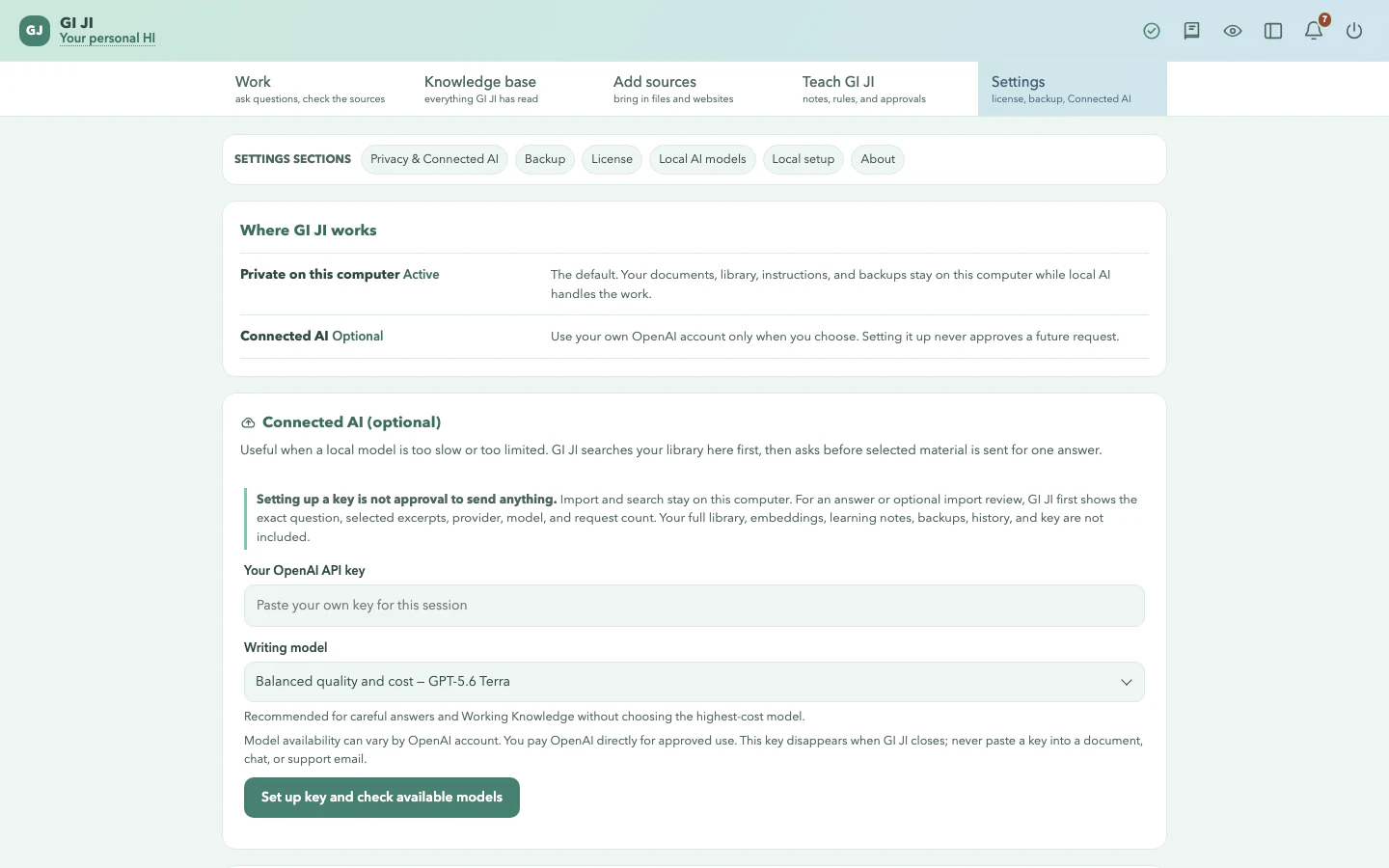

The preview shows the question or topic, selected excerpts, provider, model, request count, and approximate size. A failed request does not become approved knowledge. The API key stays in the current GI JI process and is not included in backups.
REAL USE CASES
Compare editions, positions, regulations, or reports and keep a reviewable trail.
Build a course or topic library, ask source-linked questions, and approve reusable explanations.
Keep project sources grouped, expose changes, and separate original evidence from interpretation.
Organize books and references without blending source text with your own derived notes.
GI JI is not legal, medical, financial, or compliance advice. Verify anything you rely on.
HOW GI JI COMPARES
Three comparisons with the tools you are most likely choosing between, each one naming the case where the other tool is the better buy.
WRITTEN FOR ONE READER
Four pages that answer one question properly instead of all of them briefly — what a citation is actually worth, what GI JI is and is not for a technical reader, how it stands beside a note library, and what it does for work whose material cannot leave the computer.
PLATFORM AND SETUP
GI JI 0.13.0 is a production release for macOS, Windows and Linux. Windows is available from the Microsoft Store or as a direct download. Each download carries GI JI and its installer side by side. You run the installer once: it prepares the private local AI, and GI JI fetches its two models the first time you open it — so all you need is at least 6 GiB of free disk space and the internet for that one setup.
ONE WORKSPACE — ONE OWNER
Free includes 20 documents, 3 active Working Knowledge notes, the complete review-and-approve loop, and no time limit.
One payment. Every update to GI JI is included.
Personal
$79 USD · one-time introductory price
$79 USD introductory price. The planned regular price is $99 USD; no change date is scheduled. Applicable tax is added at checkout.
A lifetime Personal licence includes every GI JI update.
THE GI JI DIRECTION
Independence, human-directed intelligence, privacy and resource awareness guide GI JI products. The Eco Impact scenario lab lets you change illustrative assumptions and see how different AI work paths scale. It is not a measurement or a claim that GI JI is always greener than cloud AI.
STRAIGHT ANSWERS
Your documents stay where you keep them. The index, questions, Working Knowledge, and backups GI JI builds sit in the GI JI folder. License activation contacts Freemius, and optional Connected AI follows the separate approval flow described below.
Connected AI is optional writing through your own OpenAI API account. Setting up a key contacts OpenAI to list the models available to that account. Connected AI is off until you switch it on. Before it writes anything for you, GI JI stops, shows you what it wants to send, and waits for you to approve that one request. You can keep the API key for the current session or choose to remember it on this computer. A remembered key is stored in data/connected.json inside the GI JI folder, excluded from GI JI backups, and removed when you choose Forget this key.
No. Sources remain original material. Working Knowledge is a separate, editable interpretation that becomes reusable only after your approval. Sources only ignores Working Knowledge.
No. A citation shows what supported an answer so you can inspect it. It is not a guarantee, and GI JI does not replace your judgment.
Saved Working Knowledge never becomes reusable silently. Candidate notes wait for review, and you can edit, approve, pause, reject, or remove them. GI JI may suggest clearly labelled document relationships automatically; if supporting evidence changes, dependent approved knowledge pauses for another look.
A computer with at least 6 GiB of free disk space and the internet for the one-time setup. The installer reuses a compatible Ollama installation or fetches a private runtime when needed, and GI JI downloads the two models it uses, about 4 GB, the first time you open it. Together that is roughly ten minutes to two hours depending on your connection, shown as it goes and resumed if it stops. After setup, GI JI needs no internet to read your documents and answer questions from them. Speed depends on your hardware.
A Personal licence activates on one computer at a time. Deactivate it in GI JI before activating it on a replacement computer. If the old computer is unavailable, contact support@giji.agency for help releasing the old activation.
GI JI 0.13.0 is a production release for macOS, Windows and Linux. Windows is available from the Microsoft Store or as a direct download.
GI JI reads text-based .pdf, .docx, .txt, .md, .html, and .htm files, folders containing them, and permitted websites. It does not perform OCR; scan-only PDFs or DOCX files must be converted to readable text first.
No. GI JI is not legal, medical, financial, or compliance advice. Answers can be wrong; verify anything you rely on.
YOUR KNOWLEDGE, LEARNING WITH YOU
Add your sources. Ask with evidence. Decide what becomes reusable.
Review Terms and RefundsRegular $99 later. One payment. Every update to GI JI is included.
Local-first · Inspectable source citations · Human approval · Backup and recovery
14-day money-back guarantee — email support@giji.agency within 14 days of purchase, for any reason, and we refund 100%. Your licence is released when the refund is issued.